 trophycase.gg
 Log in with Twitch
Tutorials
Mix It Up
Mix It Up can award trophies from commands, events, channel point redemptions, and other automations. Your trophycase.gg account is linked to your Twitch account, and awards are delivered to the trophycase.gg account linked to the recipient's Twitch username.
Choose the setup that fits how often you plan to reuse the award action.
Fastest setup
Open your trophy in Manage Trophies, then choose Mix It Up under Award with a web request → Basic → Choose your bot. Copy the prepared value: your keys, trophy code, and username variable are already filled in. Follow the steps shown there. The manual instructions below are an alternative, not additional required steps. For an unmodified URL used by those manual instructions, choose Default / Manual Setup.
Basic Award
Use this method when an automation always awards the same trophy. It is the quickest setup.
1. Copy the trophy's award URL
Open the trophy in Manage Trophies and copy its Web Request URL.
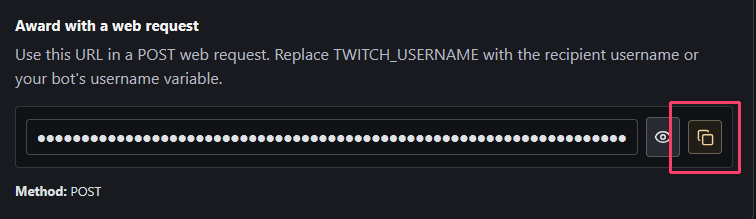
The copied URL ends with TWITCH_USERNAME. Keep the rest of the URL private because it contains your Award Secret.
2. Add the Web Request
Open the Mix It Up command or event that should award the trophy, then add a Web Request action.
- Set Method to
POST. - Paste the copied URL into Web Request URL.
- Replace
TWITCH_USERNAMEwith Mix It Up's username Special Identifier. Use$usernameto award the user who triggered the command or event. - Set Response Processing Type to JSON to Special Identifiers.
- Add the JSON value
codeand assign it to the Special Identifiertrophyawardcode.
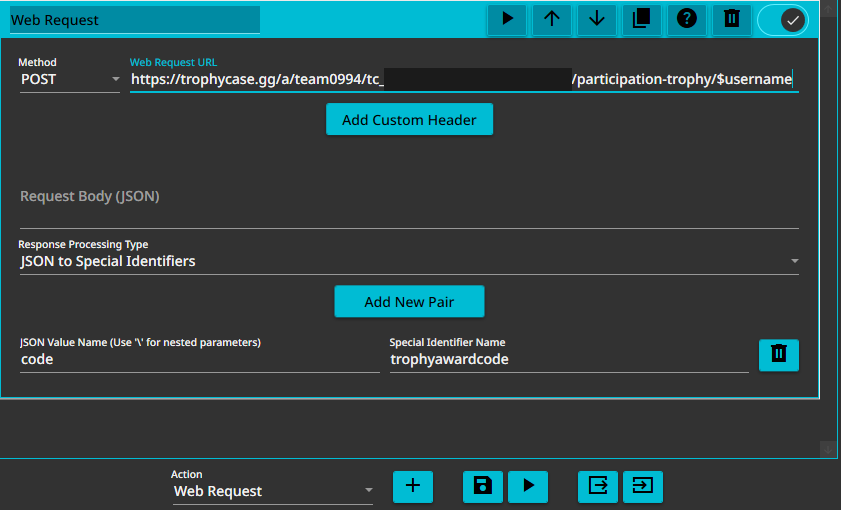
Save the action. When it runs, $trophyawardcode will contain awarded, already_owned, or shelf_not_added.
Advanced Reusable Action Group
Use this method to create one award action that can award any of your trophies. The command or event calling the Action Group supplies the recipient and Trophy Code.
1. Create an Action Group
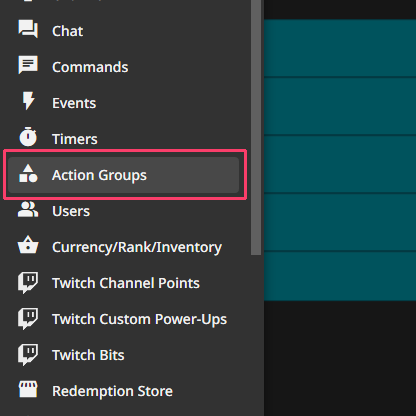
Open Action Groups from the Mix It Up navigation.
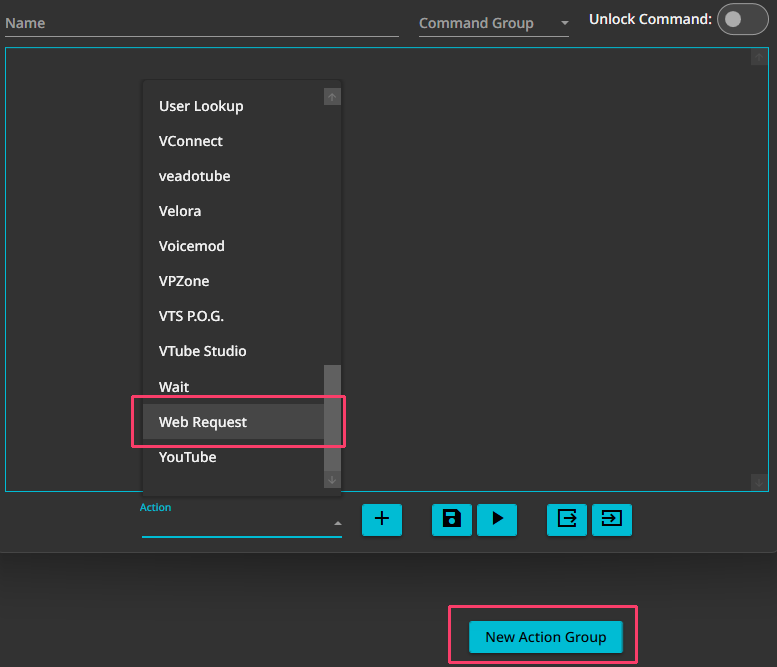
Select New Action Group, give it a recognizable name, choose Web Request from the Action menu, and add the action.
2. Find your award credentials
Sign in to trophycase.gg with the Twitch account that owns the trophies you want to award, then open Settings. Your Award ID and Award Secret are in the Award Keys section. Use the copy buttons to avoid typing either value manually.
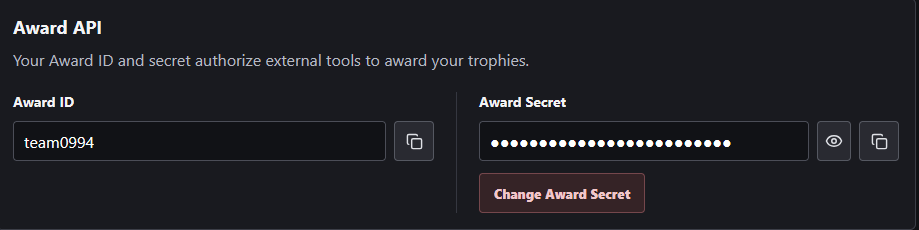
Your Award Secret authorizes trophy awards from your account. Keep it private and avoid revealing this screen while live.
3. Configure the reusable request
Set Method to POST and use this URL:
https://trophycase.gg/a/
Add this JSON to Request Body (JSON), replacing the two account placeholders with the Award ID and Award Secret shown in your trophycase.gg settings:
{
  "award_id": "YOUR_AWARD_ID",
  "award_secret": "YOUR_AWARD_SECRET",
  "twitch_username": "$arg1text",
  "trophy_code": "$arg2text"
}
Set Response Processing Type to JSON to Special Identifiers. Add the JSON value code and assign it to trophyawardcode.
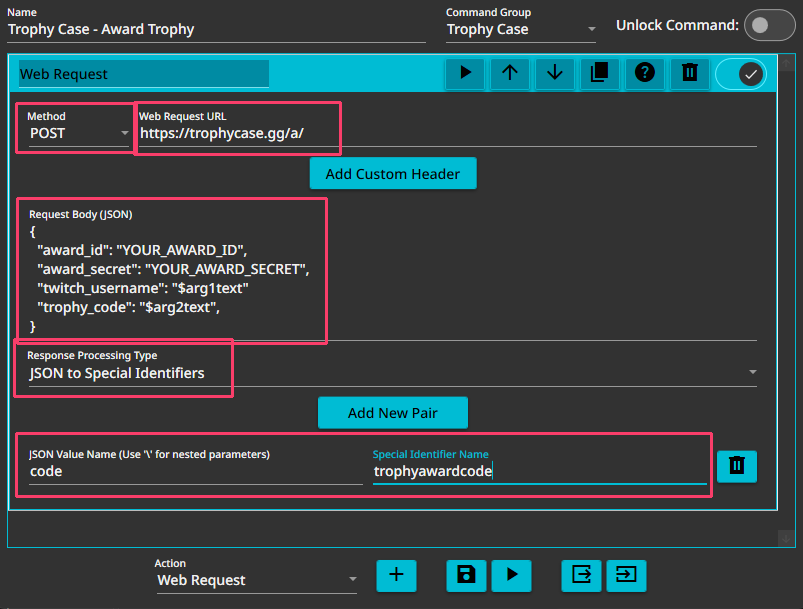
Save the Action Group.
4. Call the Action Group
Open the command or event that should award a trophy and add a Command action.
- Set Type to Run Command.
- Set Command Type to Action Group.
- Select the trophy award Action Group you created.
- In Command Arguments, enter the recipient username first and the Trophy Code second, separated by a space. For example:
$username participation-trophy
Here, $username becomes $arg1text in the Action Group and identifies the recipient by their Twitch username. That Twitch account must be linked to a trophycase.gg account. participation-trophy becomes $arg2text; replace it with the code of the trophy this command or event should award.
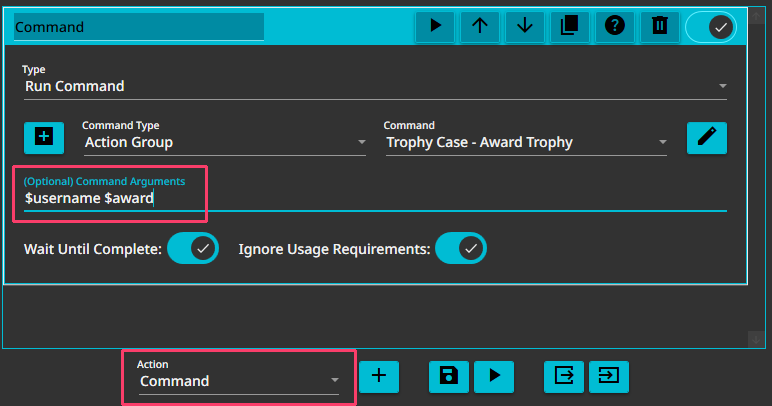
You can now call the same Action Group from other commands and events. Only the two Command Arguments need to change.
Award Responses
Use $trophyawardcode in a Conditional Action when you want Mix It Up to respond differently for each result:
| Value | Meaning |
|---|---|
awarded |
The recipient received the trophy. |
already_owned |
The recipient already owns the trophy. |
shelf_not_added |
The recipient has not added your shelf. |
See Award Responses for the complete response fields and example messages.
The official Mix It Up docs cover Web Request actions and username Special Identifiers. Keep request URLs and exported actions private.